Create new Trysil API REST
Trysil > Create new Trysil API REST creates a complete REST API server project built on Trysil, ready to compile, and opens it in the IDE. The command is available only when no project is open: close the current project group first.
The project comes from the TApiRest template, which the Expert downloads from GitHub at the moment you click Finish, so an internet connection is required. The Expert keeps the parts of the template that belong to the features you choose and removes the others, so the generated code contains only what you asked for.
One executable runs as a Windows service, as a tray application when started with /debug, and as a console application on Linux.
The wizard
The wizard has five pages; Next checks the current page before moving on.
Project
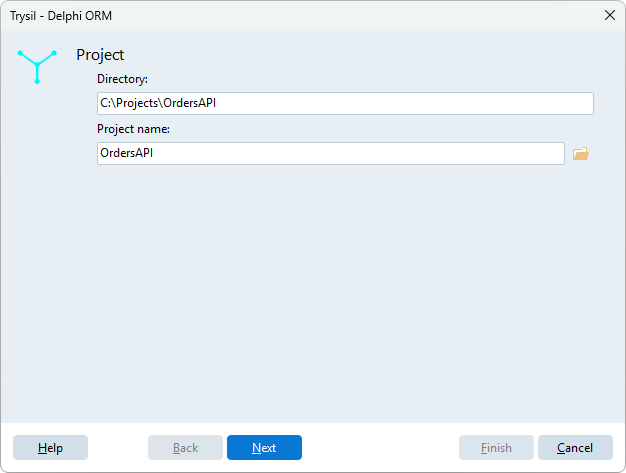
| Field | Meaning |
|---|---|
| Directory | Folder of the new project. It must be empty or not exist yet |
| Project name | Name of the .dproj and prefix of the project units |
The button next to Project name picks both with a save dialog.
API REST
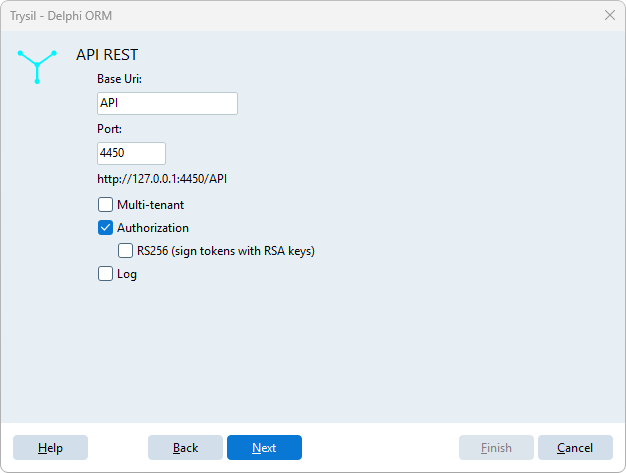
| Field | Meaning |
|---|---|
| Base Uri | Path prefix of every route, for example /api |
| Port | TCP port the server listens on. The label below shows the resulting URL |
| Multi-tenant | One database per tenant, chosen from the Host header of the request |
| Authorization | Login, JWT tokens and the /auth endpoints |
| RS256 (sign tokens with RSA keys) | Signs the tokens with an RSA key pair instead of a shared secret. Available with Authorization only |
| Log | Logs requests, responses and actions to a log database |
See Multi-Tenant and Authentication for what these features do at runtime.
Database
The connection of the application: database type, host, port, user name, password and database name. With Multi-tenant the page is titled Tenant (localhost) database and configures the first tenant, the one answering on localhost.
Host, user name and password are not used by SQLite; the port is used only by MariaDB, Oracle and PostgreSQL.
HTTP Log database
Shown only when Log is ticked: the connection of the log database, with the same fields.
Service
| Field | Meaning |
|---|---|
| Name | Name of the Windows service. It must differ from the project name |
| Description | Description of the Windows service. Default <Project name> - API REST |
Click Finish: the Expert downloads the template, generates the project and opens it.
What is generated
MyApi\
  MyApi.dproj
  MyApi.dpr
  MyApi.*.pas               project units
  Core\                     TApiRest.* base units, the same in every project
  SQL\                      scripts of the tables used by Authorization and Log
  _Config\
    MyApi.json              server, database, log and secrets
    Tenants\
      localhost-4450\
        _config.json        first tenant (Multi-tenant only)
  __trysil\                 entity model of the Expert
The Expert fills the configuration with what you entered in the wizard:
_Config\<Project>.jsongets the base URI, the port and, with Authorization, new random secrets for passwords and tokens; without Multi-tenant it also gets the database connections;- with Multi-tenant, the connections go to the tenant instead: its folder is named
localhost-<port>and its_config.jsongets the database connections; - the project settings of the Expert get the database type, so that Generate DDL script starts with the right one.
RS256 keys
With RS256 the configuration points to keys\private.pem and keys\public.pem. The Expert does not create the keys: generate an RSA key pair and put the two PEM files there before starting the server.
Secrets in the configuration
_Config\<Project>.json contains database passwords and token secrets. Keep it out of public repositories.
Next steps
The generated project already has the entity model of its own tables (for example the users, with Authorization) in __trysil. To add your entities:
- Design entity model to add them;
- Generate DDL script to create the tables;
- Generate entity model with Generate & register API REST controllers ticked: each entity gets a read/write controller, registered in the server.